AI Implementation: A 5-Step Framework
I’ve been watching the "AI revolution" from my workbench for a while now, and there is one thing that has become crystal clear: there is a massive gap between using AI and actually running a business on it.
Recently, a deep-dive study into over 20 different companies—ranging from law firms to property management groups—uncovered a repeatable blueprint for closing that gap. It isn't about having the most expensive "tech stack" or being a coding genius. It’s about a five-step process that turns AI from a fancy chatbot into a silent partner that handles the heavy lifting.
Here is the breakdown of the framework used to transform these businesses.
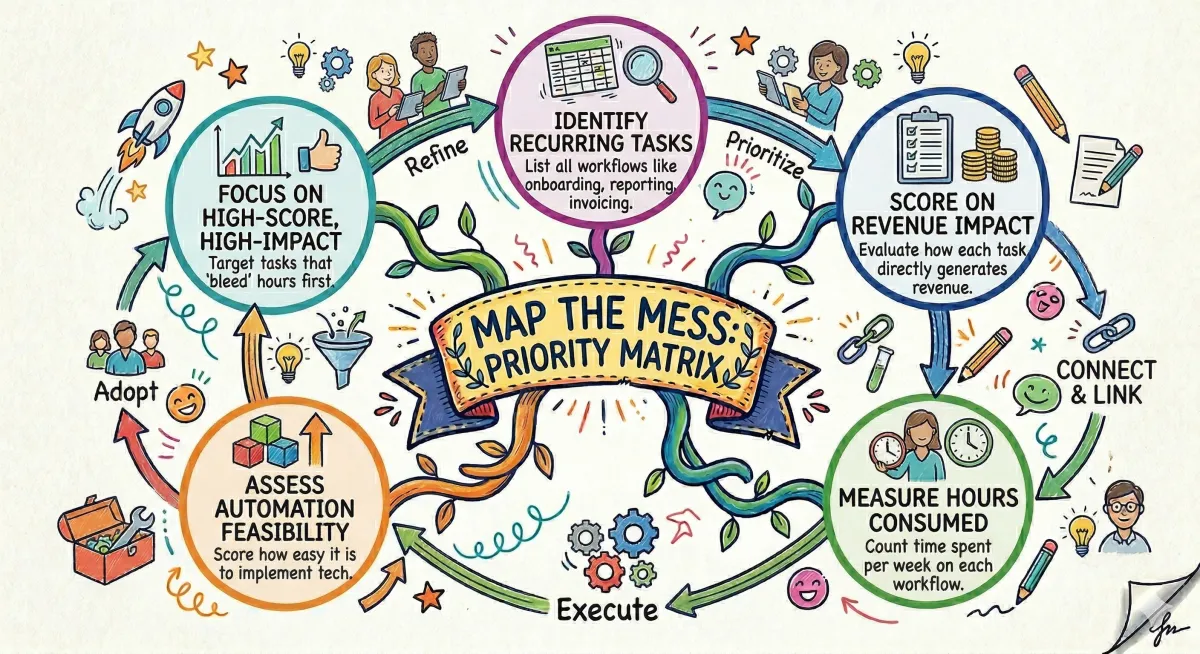
1. Map the Mess: The Priority Matrix
Before touching a single line of code or opening a prompt, the most successful implementations started with a spreadsheet. They listed every recurring workflow—onboarding, reporting, invoicing—and scored them based on three things:
Hours spent per week
Impact on revenue
Feasibility (how easy is it to automate?)
The lesson here is simple: don’t automate the "cool" stuff. Automate the stuff that bleeds 15 hours a week. In one property management firm, three people were spending nearly two workdays just triaging maintenance emails. That is the "sinkhole" where automation should start.
2. Build the Foundation: Giving the AI a Brain
Most people get generic results from AI because they give it generic context. To fix this, these companies treated the AI like a new employee. They created a core "memory" file (often called a CLAUDE.md) that contained:
Company-specific opinions and brand voice.
File naming conventions and tech preferences.
A list of "hard nos" (things the AI should never do).
By connecting this context to actual tools (like a CRM or email) through Model Context Protocol (MCP) integrations, the AI stops guessing and starts knowing. It’s the difference between asking a stranger for help and asking your lead manager.
3. The "Build Three" Rule
One of the biggest mistakes observed was trying to automate everything at once. The pros focused on just three solid automations.
The goal was to find "quick wins" that the team could feel within the first week. If an operations manager suddenly gets 5 hours of their life back because reports are now generated in 3 minutes instead of 45, the skepticism vanishes. Momentum is the fuel for tech adoption.
4. Skill Up: The "Champion" Model
Tech adoption is a people problem, not a code problem. The most effective way to roll this out wasn't a top-down mandate from a CEO. Instead, it was finding one "curious tinkerer" on the team—someone frustrated by manual work—and letting them build a "skill" (a repeatable AI task).
When a junior staffer shows their peers a tool they built that handles social media repurposing in seconds, the rest of the team naturally wants in. Enthusiasm is more contagious than any training manual.
5. The Compound Effect
The real magic happens around week four. Just like compound interest, AI systems that have "memory" and "skills" start to anticipate what’s needed.
In one instance, a marketing agency saw their billable utilization jump from 60% to 85%. That’s essentially getting three extra employees for free, just by removing the administrative "clutter." Once the system understands your business context, every new document or workflow you add stacks on top of the last one.
Lessons from the Trenches
Safety First: Lock everything down initially. Define exactly what the AI can and cannot touch.
Don't Quit Early: Most people give up in week two when things feel like "setup." The "click" happens in week three or four.
The Window is Closing: Early adopters are building layers of compounding efficiency that will be nearly impossible for competitors to catch in a year.
Technology isn't about replacing people; it's about moving those people into roles that actually grow the business.
Tinkering Tip: Start your own "Automation Priority Matrix" today. Spend 30 minutes listing your top 5 most annoying weekly tasks. Score them 1–5 on "Annoyance Level" and "Time Taken." Whatever has the highest score is your first project. Don't look for the "perfect" tool yet—just find the problem first!