
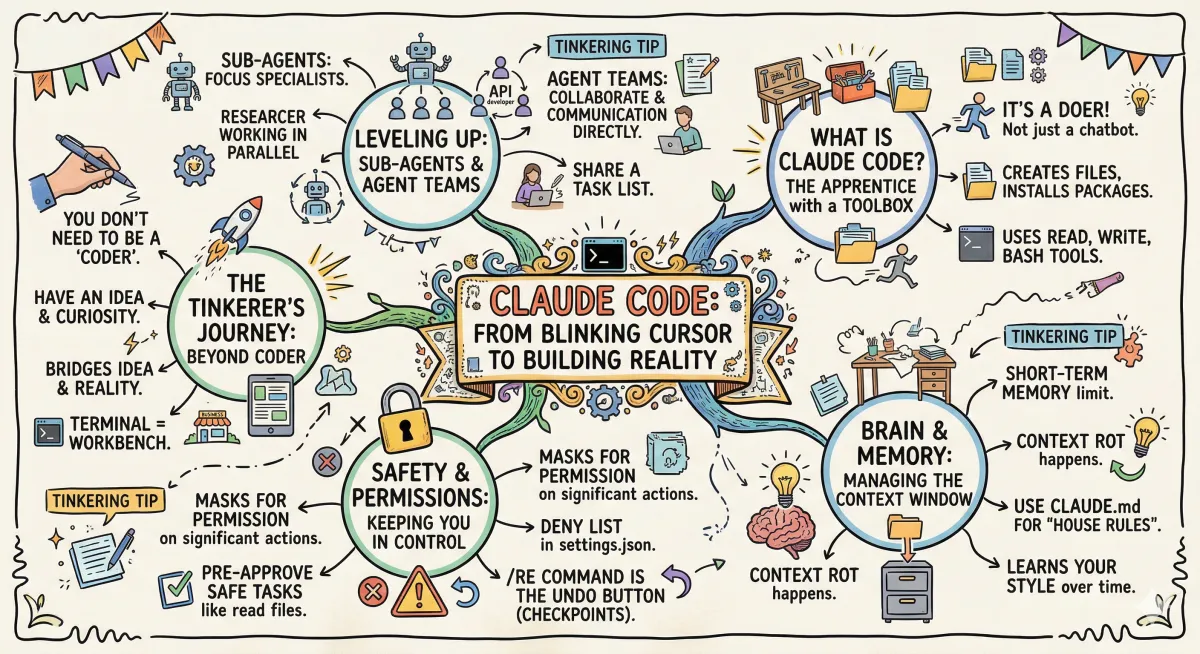
Claude Code: From Blinking Cursor to Building Reality
Beyond the Chatbox: My Journey into the World of Claude Code
I remember the first time I opened a "terminal." It was just a black screen with a blinking white cursor. To be honest? It felt cold. It felt like a place where I didn’t belong—a place reserved for people with computer science degrees and hoodies.
But then I discovered Claude Code.
I’ve spent the last few weeks obsessing over this tool (shoutout to the creators and educators in this space who paved the way). I’ve realized that the terminal isn't a wall; it’s a workbench. If you’ve felt intimidated by terms like "sub-agents" or "MCP servers," stick with me. I’m going to break down what I’ve learned into plain English.
It’s Not a Chatbot, It’s a Doer
We’re all used to chatbots. You ask a question; they give you advice. Claude Code is different. While a chatbot is like a consultant, Claude Code is like an apprentice with a toolbox.
It doesn’t just tell you how to build a website; it actually opens the files, writes the code, and installs the packages on your machine. You talk to it in plain English ("Hey, build me a landing page for my gardening business"), and it gets to work.
The "Hands" of the Operation: Tools
How does it actually touch your computer? It uses three main tools:
Read: It looks at your existing files to understand what’s going on.
Write: It creates or edits files.
Bash: This is the big one. It runs commands—like installing software or moving files—just like a human developer would.
The best part? You don't have to tell it which tool to use. You just tell it the goal, and it picks the right one.
Managing the "Brain": Context and Memory
Claude has a "short-term memory" called the Context Window. Imagine it as a desk. If you pile too many papers on the desk, things get messy, and Claude starts getting confused (I’ve heard this called "context rot").
To keep it sharp, we use a few tricks:
CLAUDE.md: Think of this as the "House Rules." You write down your preferences once (like "I prefer green buttons" or "Use TypeScript"), and Claude reads it every time it starts up.
Memory: Claude actually learns your style over time. It remembers that you like specific ways of working, even across different projects.
Safety First: Permissions and the "Undo" Button
I know what you’re thinking: "David, I don’t want an AI deleting my whole hard drive!" Neither do I. By default, Claude asks for Permission before it does anything major. You can "pre-approve" safe tasks (like reading files) to speed things up, but keep the "dangerous" stuff (like deleting folders or hitting the internet) on a "must-ask" basis.
And if it does make a mistake? There is a Checkpoint system. It’s basically a time machine. You type /re, and you can warp back to exactly how your code looked before Claude touched it. No harm, no foul.
Leveling Up: Agents and Teams
When things get complex, Claude can "clone" itself.
Sub-agents: These are specialists. If you need a logo designed while Claude is writing the text, it can spin up a sub-agent to focus just on that.
Agent Teams: This is like a small digital department. You might have one agent writing code, another testing it, and a third reviewing it. They talk to each other so you don't have to be the middleman.
Why Should You Care?
You don't need to be a "coder" to use this. You just need to be a tinkerer. You need to have an idea and the curiosity to describe it. Whether it's a dashboard for your small business or a fun app for your kids, the barrier between "idea" and "reality" is thinner than it's ever been.
The terminal isn't scary anymore. It's just where the magic happens.
Tinkering Tip: Don't try to build a whole app on day one. Open Claude Code and give it a tiny task first—something like, "Create a file called hello.txt and write a poem about a robot learning to garden." Seeing it actually create a file on your computer for the first time is the "aha!" moment that changes everything.
Happy tinkering! — David